Showing posts with label Blogging Helps. Show all posts

Get some targeted Visitors with Yahoo answers

Increase some visitors with Yahoo answers

Yahoo answers is a huge network where people question and answer and there are many users of this network which can be a plus point for a webmaster as we can use yahoo answers to get some visitors to your blog or a web page.
For an example, your blog is about weight loss and then you can search for an open question(questions that can be answered) about weight loss and provide some information on the question. Then you can use sentence like you can see the details at and provide link to your site.
Do not make your answers look spams and you will get good traffic from yahoo answers. I used to get more than 10 unique visitors every day from yahoo answers and I use this trick at the present as well.
Yahoo answers visitor

Get Faster listing(index) in Google Search Engine for New Websites

get quicker listing in Google search

Get Faster Google Listing

It takes lots of time while you submit your blog through a manual process in Google or any search engine. It takes about a week or sometimes even more but your new webpage or blog can be indexed in Google search much quicker.
If you have a back link from a PR6 website, then you can get listed in Google in one day and similarly if you get back link from pr5 webpage, you will get listed in 3 days.
So in order to get listed in Google for the first time, you can buy link to any websites or similarly you can make a link request.
so avoid submitting your website in Google manually but try getting your new sites back link freom high PR sites which will make your page indexed quicker.

use Youtube Videos to increase Page Rank of your blog

YouTube Videos Helps Increasing your PR


This might sound quite confusing but I will explain how.
YouTube videos are assigned with a page rank and there is a maximum probability and easy enough to get your pages in YouTube a higher page rank. Since most of the people embed youtube video in their web pages, it acts like backlink to your video page in YouTube and if you add link of your blog at YouTube videos descriptions, you will be counted with a back link.
Since there are many YouTube videos with a page rank of 9,8,7.... and so on,if you are able to upload popular video at YouTube you can get strong backlink from a page having a rank of 9 in YouTube.
So this may be a good idea.

Importance of Pictures/Graphics to Optimize your blog

Importance of picture in a blog

Graphic is much important in your blog or a website. It is need in order to make your blog look good is primary consideration while in the other hand there are many internal reason why you need to place and optimize Graphics in your blog. I suggest to put Graphics in each blog post because this helps to optimize your blog post to some extend.Graphics
Graphic is much important because it helps to drive some traffic to your blog is you optimize it properly. There are many people who are in search of images in Google or yahoo, so if you enter an alt tag at your images, they will be visible in Google images or yahoo images search which will help you generate some traffic.
Beside, I have experimentally found that if images are placed in the blog posts and if the image alt is made something related to the title of the blog post, that post is quite more preferred by the search engines because search engine robots tracks the image alt as well.
So I would suggest to place image with proper alt text.

How to Autoblog | Autoblogging in Blogger blogspot

Autoblogging Trick for Blogspot
It is obvious that there are many plugins for wordpress blogs in order to make an auto post but it is rare we talk about autoblogging in blogger blogs.
I have just found an idea to make auto blog posts in blogger blogs.
For this you need to activate blogging by email function.
You can follow these steps to make auto blog posts in your blog:

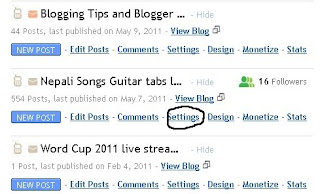
First click settings tab in your blogger dashboards,
autoblogging in blogger blogs

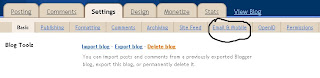
then click Email and mobile.
blogspot autoblogs


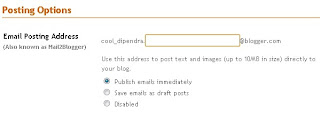
There you need to enter an email address to make an autoblogging and select the option either you want to make an instant post or save the posts in drafts.
autoblogging in blogger

Then when you create the email address, you need to subscribe the email address in the site's RSS feed whose content you want to make an auto post.

Then when you do this you will get rss to that email address and you can make a auto post.

I would suggest you to use save emails as drafts because you can edit them afterwards to maintain some better keywords.
.......................................

If you are confused, you may contact me at info@musicbid.co.cc